














Любая форма оплата
Всегда все недорого
Оперативно и в срок
Быстро и качественно









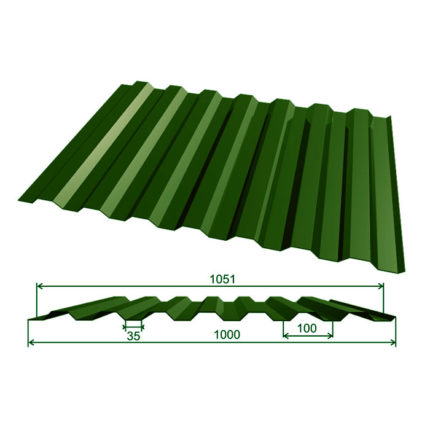
Профнастил самый востребованный вид ограждений - цена + качество

Металлический штакетник - интересное и практичное ограждение

+7 (495) 780-23-95
krovsite@yandex.ru
In today's rapidly evolving digital landscape, optimizing mobile performance is paramount for success. Users demand seamless experiences, and any lag or inefficiency can lead to frustration and ultimately, abandonment. Applications are constantly vying for attention, and standing out requires a strategic approach to resource management. This is where tools like the winspirit app come into play, offering a suite of features designed to enhance mobile device performance and user satisfaction. The ability to streamline operations, reduce battery consumption, and improve overall responsiveness are critical components of a successful mobile strategy, and understanding how to leverage such applications is becoming increasingly important.
The challenge lies in balancing functionality with efficiency. Modern smartphones, while powerful, are still constrained by battery life and processing capabilities. Applications that are poorly optimized can quickly drain resources, leading to a negative user experience. A proactive approach to performance optimization, utilizing tools that can identify and address bottlenecks, is essential. This involves careful consideration of code quality, resource allocation, and user interface design. A robust application performance monitoring system, integrated within a tool like this, can provide valuable insights into how an app is performing in real-world conditions, enabling developers to make informed decisions about improvements and maintain a competitive edge.
Effective resource management is at the heart of optimizing mobile performance. Mobile devices have limited resources – CPU, memory, network bandwidth, and battery life – and applications must be designed to utilize these resources efficiently. Poorly managed resources lead to slowdowns, crashes, and a frustrating user experience. The key is to minimize resource consumption without compromising functionality. This can be achieved through various techniques, including code optimization, image compression, and efficient data handling. Regularly profiling an application to identify resource-intensive operations is crucial. Developers need to understand where the bottlenecks are and address them accordingly. It's not always about adding more power; often, it's about using the existing power more intelligently. Analyzing the lifecycle of an application, from launch to background operation, is also vital to understand patterns of resource use.
Code optimization involves rewriting parts of an application's code to use fewer resources and execute faster. This can involve algorithmic improvements, reducing unnecessary computations, and employing data structures that are more efficient for specific tasks. Compilers can perform some level of optimization automatically, but developers can often achieve significant gains by manually optimizing critical code paths. Another important aspect is avoiding memory leaks, where memory is allocated but not released, leading to gradual performance degradation. Modern development tools offer profiling features that help pinpoint areas of code that are consuming excessive resources. Effective use of caching mechanisms can also reduce the need to repeatedly perform expensive operations, thus saving both processing time and battery life.
| Optimization Technique | Description | Impact on Performance |
|---|---|---|
| Code Profiling | Identifying resource-intensive code sections. | Significant reduction in CPU usage. |
| Image Compression | Reducing image file sizes. | Faster loading times and reduced memory usage. |
| Data Caching | Storing frequently accessed data in memory. | Reduced access times and network usage. |
| Memory Management | Preventing memory leaks and optimizing memory allocation. | Improved stability and reduced crashes. |
Following the implementation of these optimization techniques, continuous monitoring is essential. Tools can help track performance metrics over time and identify potential regressions. Regular updates to the application, incorporating these improvements, are crucial for maintaining optimal performance and user satisfaction. This iterative process of optimization and monitoring ensures that the application remains responsive and efficient as user needs and device capabilities evolve.
The winspirit app stands out as a comprehensive solution for mobile performance enhancement, offering a range of features designed to address common performance bottlenecks. It's not simply about boosting speed; it's about intelligently managing resources to deliver a consistently smooth and reliable user experience. The application leverages advanced algorithms and system-level access to optimize various aspects of device performance, from memory management to CPU scheduling. Unlike generic performance boosters, the winspirit app provides a targeted approach, tailoring its optimizations to the specific needs of each device and application. This adaptability is a key differentiator, ensuring that users benefit from real, measurable improvements without encountering unintended side effects. Furthermore, the app’s user-friendly interface allows for easy customization and control over the optimization process.
The core functionality of the winspirit app centers around intelligent resource allocation. It analyzes how applications are using system resources and dynamically adjusts their priority to ensure that the most important tasks receive the necessary processing power. This prevents resource-intensive applications from monopolizing the CPU and causing slowdowns. The app also includes a powerful memory cleaner that identifies and removes unnecessary files and cache data, freeing up valuable memory space. Another key feature is its ability to optimize network connectivity, reducing data usage and improving download speeds. The app achieves this by intelligently managing background data synchronization and optimizing network settings. Regular performance tests are then reported to the user, allowing them to review improvements.
Beyond these core features, the winspirit app also incorporates a user-friendly interface that provides real-time performance monitoring. Users can view detailed graphs and charts that illustrate how their device is performing, identifying potential bottlenecks and areas for improvement. This level of transparency empowers users to take control of their device's performance and make informed decisions about which applications to optimize or restrict.
One of the most significant challenges facing mobile users is battery drain. Modern smartphones are packed with features that consume power, and keeping a device charged throughout the day can be a struggle. The winspirit app tackles this issue head-on by optimizing power consumption across various system components. It identifies applications that are draining excessive battery life and provides users with options to limit their background activity or even force-stop them. The app also implements intelligent power-saving modes that automatically adjust screen brightness, network connectivity, and CPU frequency based on usage patterns. By reducing unnecessary power consumption, the app can significantly extend battery life, allowing users to enjoy their devices for longer periods without needing to recharge. This proactive approach to power management is crucial for maintaining the longevity of mobile devices.
Implementing proactive power management strategies involves more than just reducing resource consumption. It also means understanding how different applications and system processes interact with each other. The winspirit app employs advanced algorithms to analyze these interactions and identify potential conflicts that are contributing to battery drain. For example, it can detect applications that are constantly waking up the device in the background, even when they are not being actively used. By optimizing these processes, the app can minimize unnecessary wake-ups and significantly reduce power consumption. Furthermore, the app provides users with detailed reports on battery usage, showing them which applications are consuming the most power and allowing them to make informed decisions about how to manage their devices. It’s important to consider that even seemingly harmless applications can contribute to battery drain if they are not properly optimized.
Beyond these technical optimizations, user behavior also plays a crucial role in battery life. Avoiding excessive screen time, disabling unnecessary notifications, and limiting background data synchronization can all contribute to significant power savings. The winspirit app empowers users to make these changes by providing a clear understanding of their device's power consumption patterns and offering intuitive controls for managing various system settings.
While optimizing performance is a primary goal, it’s equally important to consider security and privacy implications. A well-optimized device shouldn’t come at the expense of user data or system integrity. The winspirit app is designed with a strong emphasis on security, employing robust encryption techniques to protect user data and prevent unauthorized access. The app also adheres to strict privacy guidelines, ensuring that user data is not collected or shared without explicit consent. Regular security audits and vulnerability assessments are conducted to identify and address potential threats. The developers understand that trust is paramount, and they are committed to providing a safe and secure experience for their users. It is important for users to only download applications from trusted sources and to carefully review the app’s privacy policy before granting access to their data.
In addition to built-in security features, the winspirit app also incorporates features that help protect against malware and other security threats. It can scan applications for malicious code and block access to known malicious websites. This proactive approach to security helps safeguard users from phishing attacks and other online scams. The application consistently receives updates to stay ahead of emerging threats. Furthermore, the app’s developers are committed to transparency, providing users with clear information about how their data is being used and protected. Maintaining a secure and private mobile environment is not simply a matter of installing an application; it’s an ongoing process that requires vigilance and a commitment to best practices.
The field of mobile performance optimization is constantly evolving, driven by advancements in hardware and software technologies. Emerging trends include the integration of artificial intelligence and machine learning algorithms to provide even more intelligent resource management. These algorithms can learn from user behavior and dynamically adjust optimization settings to maximize performance and battery life. Furthermore, the development of new battery technologies, such as solid-state batteries, promises to deliver significant improvements in energy density and charging speeds. As devices become more powerful and complex, the need for sophisticated optimization tools will only increase. The ability to seamlessly integrate these technologies into applications like the winspirit app will be crucial for maintaining a competitive edge and providing users with the best possible experience. The future will likely see a shift toward proactive, predictive optimization, where applications anticipate user needs and adjust resources accordingly.
Another area of focus will be the optimization of augmented reality (AR) and virtual reality (VR) applications, which are known to be resource-intensive. Efficiently managing the demands of these applications will require innovative approaches to rendering, data compression, and power consumption. The development of specialized hardware and software solutions will be critical for unlocking the full potential of AR and VR technologies. As the mobile ecosystem continues to evolve, the winspirit app and similar tools will play an increasingly important role in ensuring that users can enjoy a seamless and responsive mobile experience, regardless of the demands of the applications they are using.
У вас еще нет аккаунта?
Создать аккаунт